How to Set Up SMTP in WordPress: Step-by-Step (2026)
Set up SMTP in WordPress with WP Mail SMTP so contact form and order emails reach the inbox: install, choose Other SMTP, add host and port, send a test.

On this page
To set up SMTP in WordPress, install the free WP Mail SMTP plugin, open WP Mail SMTP > Settings, set your From Email, choose the Other SMTP mailer, enter your email provider's SMTP host, port, encryption, username and password, then send a test from WP Mail SMTP > Tools > Email Test.
Time required: 20 to 30 minutes
What you'll need:
- A business email address on your domain (for example hello@yourdomain.com)
- That mailbox's SMTP details: host, port, encryption, username, password (from your email provider)
- WordPress admin access
By default WordPress sends mail through the server's PHP mail function. Those emails often land in spam or vanish, which is why contact forms "stop working". SMTP sends the same emails through a real, authenticated mailbox. For the DNS side (SPF, DKIM, DMARC), read business email deliverability explained.
Step 1: Find your SMTP details
Get these from your email provider's help pages or control panel, not from a random forum:
| Provider | SMTP host | Port / encryption |
|---|---|---|
| Hostinger email | smtp.hostinger.com | 465 / SSL |
| Zoho Mail (India data centre) | smtp.zoho.in | 465 / SSL or 587 / TLS |
| Google Workspace or Gmail | Use the Google mailer in WP Mail SMTP, or smtp.gmail.com with an app password | 465 / SSL or 587 / TLS |
| cPanel hosting email | Usually mail.yourdomain.com | Shown in cPanel > Email Accounts > Connect Devices |
The username is normally the full email address, and the password is that mailbox's password (or an app password if two-step login is on).
Step 2: Install WP Mail SMTP
Where: WordPress admin > Plugins > Add New Plugin
- Go to Plugins > Add New Plugin and search WP Mail SMTP.
- Install and activate WP Mail SMTP by WPForms.
- If the setup wizard opens, you can follow it, or exit and use the settings page below. The fields are the same.
Run only one SMTP plugin. Two mail plugins fight over the same WordPress function and cause confusing failures.
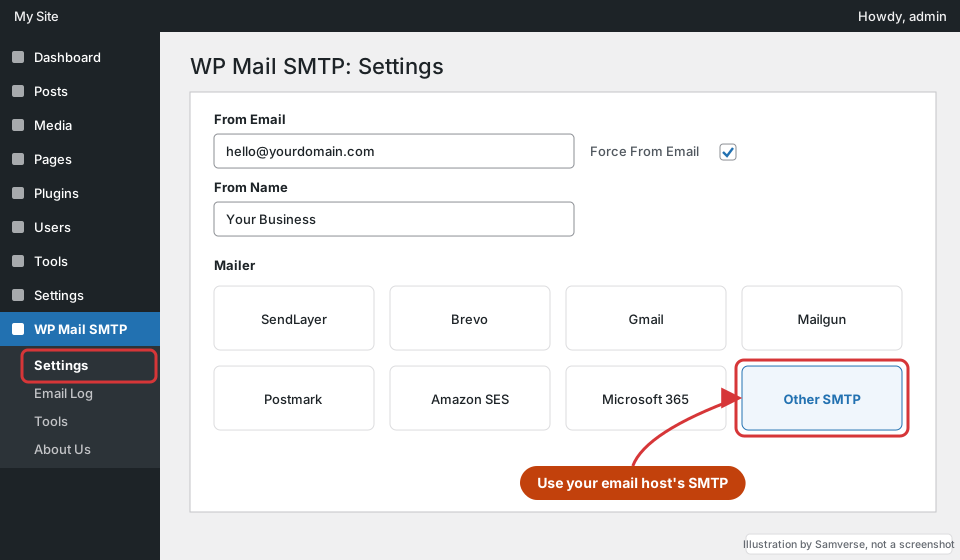
Step 3: Set the From Email and choose Other SMTP
Where: WordPress admin > WP Mail SMTP > Settings > General
- From Email: the mailbox you will authenticate with, such as
hello@yourdomain.com. Tick Force From Email so forms cannot override it with the visitor's address. - From Name: your business name.
- Mailer: choose Other SMTP. (If you use Gmail or Microsoft 365, the dedicated Google or Microsoft mailer is more reliable than plain SMTP.)
Step 4: Enter host, port and login
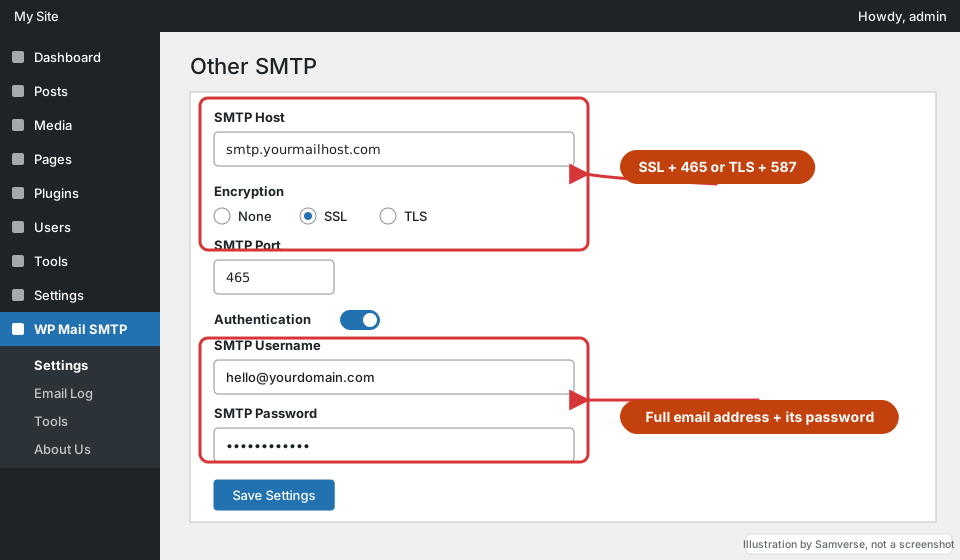
Where: WP Mail SMTP > Settings > Other SMTP section (same page)
- SMTP Host: from Step 1.
- Encryption: SSL with port 465, or TLS with port 587. These pairs matter: SSL on 587 will fail.
- Auto TLS: leave on.
- Authentication: on. Enter the full email address as username and the mailbox password.
- Click Save Settings.
WP Mail SMTP stores the password in the database. If you prefer, it supports defining it in wp-config.php instead; its documentation lists the constants.
Step 5: Send a test email
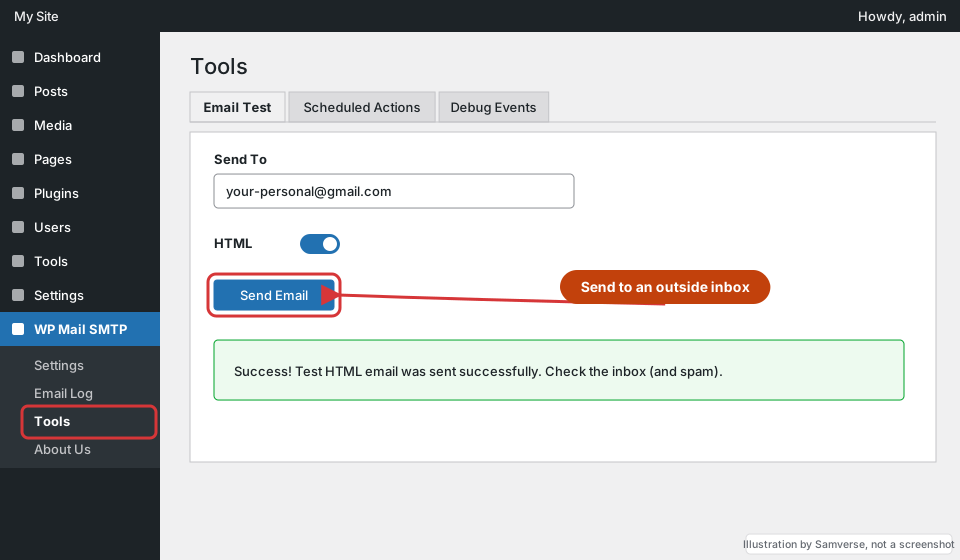
Where: WordPress admin > WP Mail SMTP > Tools > Email Test
- Open WP Mail SMTP > Tools and the Email Test tab.
- Send To: an address outside your domain, such as a personal Gmail.
- Click Send Email. You should see a success message and the email should arrive in the inbox, not spam.
Then submit your real contact form and, on a WooCommerce store, place a test order. Those are the emails that actually matter.
Step 6: Fix the From address in your form plugin
Contact Form 7, WPForms, Fluent Forms and others each have their own notification settings. Set the notification "From" to your own domain address and put the visitor's email in Reply-To. Sending "from" the visitor's Gmail address is the classic reason form emails are rejected. See WordPress form plugins compared for where each plugin keeps this setting.
SMTP or a transactional email service?
"Other SMTP" with your normal mailbox is the simplest setup and is fine for a business site sending contact form notifications. A busier site, especially a WooCommerce store sending order, shipping and password emails to customers, can outgrow it:
- Mailbox sending limits. Business mailboxes have daily sending limits set by the provider. A sale or a newsletter-style plugin can hit them, and then every email fails until the limit resets.
- Reputation is shared. If WordPress emails are marked as spam, the same mailbox you use for client emails can be affected.
- Transactional services (the dedicated mailers WP Mail SMTP lists, such as SendLayer, Brevo, Mailgun, Postmark or Amazon SES) are built for automated emails, give delivery logs, and connect through an API key instead of a password.
If you switch to one, you will add DNS records the service gives you (usually DKIM and sometimes a return-path CNAME) and choose that mailer in WP Mail SMTP instead of Other SMTP. The test step is the same.
Whichever you use, make one person responsible for the mailbox or service login. When that login lives with a former developer, email setups break silently and nobody notices until enquiries stop. The website ownership checklist covers which accounts you should hold yourself.
Troubleshooting
- "Could not authenticate": wrong password, or the provider needs an app password because two-step login is on.
- Connection timed out: wrong port/encryption pair, or your host blocks outgoing SMTP ports. Try 587/TLS, or ask the host to open the port.
- Test arrives but lands in spam: SMTP is working; the domain's SPF, DKIM or DMARC records are missing or wrong.
- Test works but forms still fail: the form plugin's From address is overriding yours. Turn on Force From Email and fix the form notification.
FAQs
Do I need SMTP in WordPress?
For any site with a contact form or a shop, yes. Server mail is unauthenticated and often filtered as spam; SMTP sends through a real mailbox.
Is WP Mail SMTP free?
The core plugin with the Other SMTP mailer is free. Paid versions add features such as email logs and extra mailers.
Which port should I use for SMTP in WordPress?
Use 465 with SSL or 587 with TLS, whichever your email provider lists. Avoid port 25, which many hosts block.
Stuck on a step?
Tell me where you got stuck and I'll reply with a plan and a fixed quote, usually within 24 hours.