Logo, Favicon Format and Brand Basics for Your Website: File Formats, Sizes, Social Share Images and Consistency
The favicon sizes, logo formats (SVG, PNG) and social share image a website needs, with copy-ready favicon code and a one-page brand sheet to hand over.

On this page
- The logo files your website needs
- Getting the logo right in the header
- Favicon format and sizes: ICO, SVG or PNG?
- Social share images
- Help Google show the right logo
- Colours, fonts and imagery: a one-page brand sheet
- Consistency across every channel
- Before your website project: a checklist
- Quick check: how does your brand show up?
- When to get help
- FAQs
- Get your logo as an SVG plus PNG versions, in horizontal, stacked, icon-only and reversed forms, and keep the original design files in your business name.
- One simple square icon of at least 512 pixels covers the favicon and phone home-screen icons; WordPress generates the smaller sizes from it.
- Set a 1200 by 630 social share image and an organisation logo in your SEO plugin, and use the same name, logo and colours everywhere customers see you.
For a website, you need your logo as an SVG file plus transparent PNG versions, in a horizontal layout for the header, a stacked or square layout, an icon-only mark and a light version for dark backgrounds. From the icon you make a favicon and app icons, ideally from one square image of at least 512 pixels, and you add a social share image of 1200 by 630 pixels so links look right on WhatsApp and LinkedIn. Then use the same name, logo, colours and fonts everywhere customers see you.
Short answer: The best favicon format is a favicon.ico holding 16 and 32 pixel images for every browser, plus an SVG icon for modern browsers, a 180 by 180 PNG apple-touch-icon for iPhones, and 192 and 512 pixel PNGs listed in a web app manifest for Android. On WordPress, uploading one 512 pixel square Site Icon covers most of this.
Whether you're planning a website redesign, a rebrand or your first site, collecting these files first makes the project faster.
Need the files? The free favicon and app icon generator makes every size from one image, with the link tags to paste.
The logo files your website needs
A single JPEG from WhatsApp isn't enough: the logo appears at different sizes, on light and dark backgrounds, and as a tiny tab icon.
| Asset | Format | Size to prepare | Where it's used |
|---|---|---|---|
| Horizontal logo | SVG, plus PNG or WebP | PNG at twice the display size, so it's sharp on high-resolution screens | Site header |
| Stacked or square logo | SVG and PNG | Large square PNG, such as 1000 by 1000 pixels | Footer, social profiles, Google Business Profile |
| Icon-only mark | SVG and PNG | At least 512 by 512 pixels, square | Favicon, site icon, app icons |
| Reversed (light) version | SVG and PNG | Same as the main logo | Dark headers, footers and photos |
| Favicon | ICO or PNG, optionally SVG | Generated from the icon; 32 by 32 is the common browser size | Browser tabs and bookmarks |
| Apple touch icon | PNG | 180 by 180 pixels | iPhone home screen |
| Android icons | PNG | 192 by 192 and 512 by 512 pixels | Android home screen |
| Social share image | JPG or PNG | 1200 by 630 pixels | WhatsApp, LinkedIn and Facebook link previews |
Ask your designer for the original source files too, whether Illustrator, Figma or EPS, along with the font names and licences. Keep them somewhere the business controls, not only in the designer's account; the website ownership checklist lists brand assets alongside your domain and hosting.
Getting the logo right in the header
- Use SVG where you can. It stays sharp at any size and is usually tiny in file size. WordPress blocks SVG uploads by default for security reasons, so use a plugin that sanitises SVG files, such as Safe SVG, rather than switching the protection off.
- If you use PNG or WebP, export it at twice the size it displays, then let the theme scale it down, so it isn't blurry on modern phones.
- Size it for phones first. A wide logo with a tagline becomes unreadable at mobile header height.
- Give it a width and height, so the header doesn't jump as the logo loads; see fixing layout shift.
- Alt text should be your business name, such as "Sharma Dental Clinic", and the logo should link to the homepage.
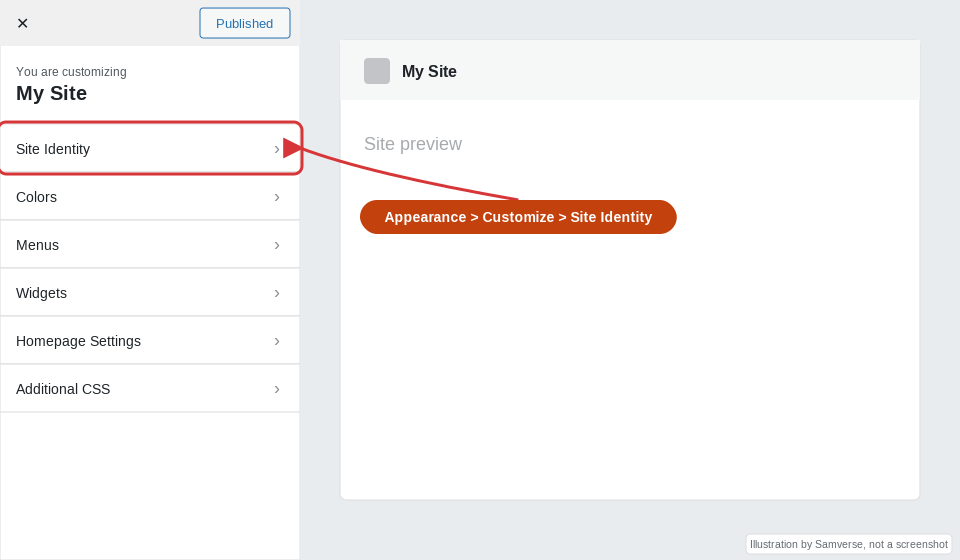
In most themes the logo is set under Appearance > Customize > Site Identity. In a block theme, it's the Site Logo block in the header template, and in Elementor it's under Site Settings > Site Identity.
Favicon format and sizes: ICO, SVG or PNG?
The right favicon format depends on where the icon shows: use favicon.ico (16 and 32 px) for older browsers and Google results, an SVG favicon for modern browsers that supports dark mode, and PNG files for phone home screens (180 px for Apple, 192 and 512 px for Android).
Favicon sizes and app icons
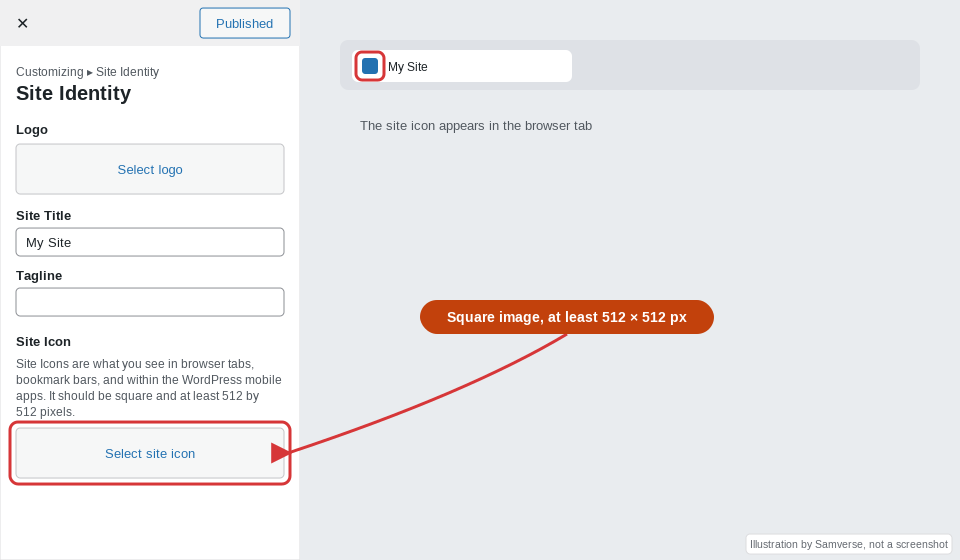
The favicon shows in browser tabs, bookmarks and next to your site in Google's mobile results, and becomes the home screen icon when someone saves your site.
Favicon size chart
| Size (pixels) | File and tag | Where it's used |
|---|---|---|
| 16 by 16 | Inside favicon.ico, or a PNG with rel="icon" | Browser tabs and bookmarks on standard screens |
| 32 by 32 | Inside favicon.ico, or a PNG with rel="icon" | Browser tabs on high-density screens, taskbars and shortcuts |
| 180 by 180 | apple-touch-icon.png, rel="apple-touch-icon" | iPhone and iPad home screen |
| 192 by 192 | PNG listed in the web app manifest | Android home screen |
| 512 by 512 | PNG listed in the web app manifest | Android splash screens and app installs; also a good master size |
| Any size | SVG with rel="icon" and type="image/svg+xml" | Modern browsers that support SVG favicons; keep the ICO as a fallback |
A single favicon.ico file can hold both the 16 and 32 pixel versions. Browser support for SVG favicons varies, so treat it as an extra, not a replacement.
Favicon format: ICO vs PNG vs SVG
| Format | Strengths | Limits | Use it for |
|---|---|---|---|
| ICO | Works in every browser; one file holds several sizes; browsers look for /favicon.ico automatically | Raster only, so it blurs if scaled | The fallback at the site root, with 16 and 32 pixel images |
| PNG | Sharp, transparent, easy to export | One size per file | apple-touch-icon (180) and manifest icons (192, 512) |
| SVG | Sharp at any size; can switch colours for dark mode with a CSS media query inside the file | Not supported by every browser, notably older Safari | An extra icon for modern browsers, alongside the ICO |
Android reads its icons from the web app manifest, a small JSON file linked with <link rel="manifest" href="/site.webmanifest">. It lists the 192 and 512 pixel PNGs under icons, plus a theme_color that tints the browser bar.
Designing a favicon that works at 16 pixels
- Use the icon-only mark or a single letter, not the full logo with words.
- Keep it bold and simple, with strong contrast and a solid or transparent background.
- Preview it at actual size in a browser tab, in both light and dark browser themes.
Setting it in WordPress
WordPress calls it the Site Icon. Upload one square image of at least 512 by 512 pixels under Appearance > Customize > Site Identity; recent WordPress versions also offer it under Settings > General, Elementor has it in Site Settings, and block themes offer "Use as site icon" in the Site Logo block. WordPress then generates the smaller sizes and adds the right tags for browsers, iPhones and Android phones.
On a custom-coded site, you add the tags yourself. A modern minimal set looks like this:
<link rel="icon" href="https://example.com/favicon.ico" sizes="32x32">
<link rel="icon" href="https://example.com/icon.svg" type="image/svg+xml">
<link rel="apple-touch-icon" href="https://example.com/apple-touch-icon.png">
<link rel="manifest" href="https://example.com/site.webmanifest">
At the time of writing Google it recommends a square icon larger than 48 by 48 pixels at a stable, crawlable address.
If a post shares with no image or the wrong one on WhatsApp or Facebook, fixing a missing featured image covers Open Graph tags and cached previews.
Social share images
Link previews on WhatsApp, LinkedIn and Facebook take their image from your Open Graph tags; without one, the platform picks a random image or none.
- Create a branded default image at 1200 by 630 pixels, with your logo and a short line about what you do. Keep important text away from the edges, since some apps crop it.
- Set it as the default in your SEO plugin: in Yoast SEO and Rank Math it's in the social or Open Graph settings.
- Give key pages and blog posts their own share images where it helps, such as a service page or a popular article.
- Test a link with Facebook's Sharing Debugger or LinkedIn's Post Inspector, which also clear old cached previews.
Help Google show the right logo
Google can use the logo you specify in Organization structured data, for example in a knowledge panel for your brand. SEO plugins add this for you when you fill in the organisation name and logo in their settings. The output looks something like this:
<script type="application/ld+json">
{
  "@context": "https://schema.org",
  "@type": "Organization",
  "name": "Example Interiors",
  "url": "https://example.com/",
  "logo": "https://example.com/wp-content/uploads/example-logo-512.png"
}
</script>
Use a square or near-square version on a plain background, at least 112 by 112 pixels per Google's guidelines at the time of writing. Schema markup explained covers which other structured data is worth adding.
Colours, fonts and imagery: a one-page brand sheet
One page your designer, developer and printer can all use is enough:
- Logo versions and the minimum size each should be shown at.
- Colours as hex codes: a primary, an accent, text and background colours. How to choose website colours and fonts covers picking them and checking contrast.
- Fonts for headings and body text, with the weights you use.
- Photo style: real photos of your team, work and premises, with similar lighting and editing; see preparing photos for your website.
- Tone of voice: a few words on how you write, such as plain, friendly and direct.
On WordPress, the colours and fonts go into global styles, in the theme, the block editor's Styles panel or Elementor's Site Settings, so one change updates the whole site.
Consistency across every channel
Use the same business name, logo and colours on your website, Google Business Profile, social profiles, WhatsApp Business profile, email signature, invoices and signboard. Consistent business details also help Google match your website to your profile in local search. When the logo changes, update all of them together; rebranding your website has a full checklist, including protecting your SEO if the name changes too.
Before your website project: a checklist
- Logo in SVG and PNG, in horizontal, stacked, icon-only and reversed versions.
- A square icon of at least 512 pixels for the favicon.
- Brand colours as hex codes and font names, with licences.
- A default social share image, or the elements to make one.
- Real photos, and two or three websites whose style you like.
Put these in your website brief so your developer can quote accurately.
Quick check: how does your brand show up?
- Search your business name on Google on a phone and check your favicon shows next to the result, not a generic globe.
- Run the page through PageSpeed Insights (pagespeed.web.dev) and read the Mobile tab first and check the logo file is not listed as a large image to compress.
When to get help
Get help when the logo looks blurry or makes the layout jump on mobile, Google still shows an old favicon weeks after a change, WhatsApp previews show the wrong image, or your brand files exist only as one JPG.
If your website no longer matches your brand, or you're rebranding, a website redesign brings the logo, colours and fonts into one consistent, mobile-first design without losing the rankings you have. If you already have a finished design, see Figma to WordPress. For smaller logo and favicon fixes, you can hire a WordPress developer or send your website address for a fixed quote.
To put the icon on a WordPress site, follow the tutorial on how to add a favicon in WordPress.
FAQs
What is the best favicon format?
Use a favicon.ico with 16 and 32 pixel images as the universal fallback, add an SVG favicon for modern browsers, a 180 pixel PNG apple-touch-icon for Apple devices and 192 and 512 pixel PNGs in a web manifest for Android.
Can a favicon be a PNG instead of ICO?
Yes. All modern browsers accept a PNG favicon linked with rel="icon". Keep a favicon.ico at the site root as well, because some browsers, feed readers and tools still request /favicon.ico directly.
What size should a website logo be?
There is no single size, because themes display logos differently. Use SVG if possible. For PNG, export at twice the size the logo appears in the header, so a logo shown 200 pixels wide is exported 400 pixels wide.
What size should a favicon be?
Start with a square image of at least 512 by 512 pixels. WordPress and favicon generators create the smaller sizes from it: 16 and 32 pixels for browser tabs, 180 by 180 for iPhones, and 192 and 512 pixels for Android and the web app manifest.
Why isn't my new favicon showing?
Browsers cache favicons for a long time. Clear your cache or try a private window. If Google still shows the old one in search, it updates when it recrawls your homepage, which can take a while.
Can I use a JPEG logo on my website?
You can, but JPEG has no transparency, so it shows a box on coloured backgrounds, and text edges blur. Ask your designer for SVG and transparent PNG versions.
Do I need a new logo before I redesign my website?
Not necessarily. If your current logo is clear and works small, a redesign can use it. If you're changing it, finalise the logo before the website design starts, so the colours and layout are built around it.
Need help with your website?
I'm a freelance WordPress developer building fast, SEO-friendly websites since 2020. Tell me what you need and I'll reply with a plan and a fixed quote, usually within 24 hours.
Freelance WordPress development, building websites for clinics, manufacturers, agencies and online stores since 2020.
More about me