Lead Form Thank You Page Redirect: What to Put on the Page, How to Set It Up in WordPress and How to Track It
Send visitors to a thank you page after form submission in WPForms, Elementor or Contact Form 7, then track it as a lead in GA4 and Google Ads.

On this page
- A lead form thank you page redirect confirms the enquiry arrived, says honestly what happens next, offers a faster route such as WhatsApp, and gives you a reliable conversion to track.
- Redirect only after a successful submission, keep the page out of Google with noindex rather than robots.txt, and give each important form its own thank-you URL.
- Count each enquiry once: use a generate_lead key event set to once per session in GA4, set Google Ads to count one conversion, and test with a real submission.
Short answer: To show a thank you page after form submission, create the page, then set the form's confirmation to redirect to that page in WPForms, Elementor Forms or Contact Form 7. Track a visit to that page as a lead in GA4 and Google Ads.
A lead form thank you page redirect sends a visitor to a dedicated thank-you page after they successfully submit a form on your website. A good thank-you page confirms the enquiry arrived, says honestly what happens next, offers a faster route such as WhatsApp or a call, and points to something useful to read while they wait. It also gives you a reliable conversion to track in Google Analytics 4, Google Ads and Meta. Set your form to redirect there only after a successful submission, keep the page out of Google, and make sure each enquiry is counted once.
Every landing page in my landing page design service comes with a thank-you page, and conversions are counted on successful submissions, through the thank-you page or the form's success event, never on clicks of the submit button, which also count failed attempts.
A thank-you page can't help if submissions fail or the emails never arrive. If enquiries have dried up, check that first with why your contact form isn't getting enquiries.
Short answer: A thank-you page after form submit confirms the enquiry arrived, says what happens next and offers a faster route such as WhatsApp. Set the form to redirect there only after a successful submission, keep the page noindexed, and track it as one conversion in GA4, Google Ads and Meta so each enquiry is counted once.
What to put on a thank-you page
- A clear confirmation in the heading, such as "Thanks, we've received your enquiry".
- What happens next, honestly: who will reply, how (phone, WhatsApp or email) and roughly when. Only promise a response time you keep; responding to enquiries fast has a simple routine.
- A faster route for people in a hurry: a WhatsApp button with a pre-filled message and a tap-to-call number.
- What to have ready, such as a floor plan for an interior project or recent reports for a clinic, so the first conversation is useful.
- Something worth reading: a relevant case study, a guide to the process or answers to common questions.
- Genuine proof, such as a real testimonial or a link to your Google reviews, which reassures people they made a good choice.
- A spam-folder note if you send an automatic email reply, since first emails from a new address sometimes land there.
Leave off another form asking for the same details, pop-ups, pushy offers and anything that makes the page a dead end; keep your normal header and footer so visitors can carry on browsing. Shop order pages follow the same idea; see WooCommerce checkout optimisation. Different forms need slightly different pages:
| Form | What its thank-you page should add |
|---|---|
| Quote request | What you'll need from them and when they can expect the quote |
| Call-back request | When to expect the call and the number you'll call from, so they pick up |
| Appointment request | The details they sent, your address with a map link and how to reschedule |
| Brochure or price list | The download link itself, plus related products or services |
| Newsletter sign-up | A reminder to confirm their email if you use double opt-in |
How to redirect a lead form to a thank-you page
Whichever form plugin you use, a lead form redirect follows the same pattern:
- Publish the thank-you page first, with a clear URL such as /thank-you-quote/, and set it to noindex.
- Open the form's confirmation or after-submit settings and swap the on-screen message for a redirect to that page. Most WordPress form plugins offer this as a choice between showing a message, showing a page or going to a URL.
- Make sure the redirect fires only on success. Built-in confirmation settings do this already; a custom script should listen for the plugin's success event, not the button click.
- Use one thank-you URL per lead form, so each page view maps to exactly one type of lead.
- Set up the conversion on that page view in GA4, Google Ads or Meta, as explained below, and send a real test enquiry to confirm the lead, the email and the conversion all arrive.
The tracking angle is the main reason to redirect at all: a dedicated URL that only successful submitters reach is the simplest conversion signal there is, and it works even when an ad platform's own form tracking doesn't.
When the lead form redirect does not work
- The form shows a message instead of redirecting: a caching or optimisation plugin may be serving an old copy of the form settings. Clear the cache and test again in a private window.
- The redirect fires but no email arrives: the form is working but mail delivery is not. Fix email sending, usually with SMTP, before trusting the conversion count.
- The redirect goes to a 404: the thank-you page slug changed or the page is still a draft. Publish it and update the URL in the form.
- Conversions are much higher than enquiries: the page is being reached without a submission, often from search, a menu link or a refresh. Check noindex, remove links to it and set counting to once.
- The redirect fires on a failed submission: a custom script is listening for the button click. Switch it to the plugin's success event.
- The redirect works on desktop but not on a phone: a pop-up blocker, a slow mobile connection or a script error on the page can interrupt it. Test on a real phone over mobile data, and check the browser console for errors on the form page.
Setting the redirect in WordPress form plugins
Create the thank-you page as a normal WordPress page first, then point the form at it. At the time of writing, the settings are here:
| Plugin | Where to set it |
|---|---|
| WPForms | In the form builder, Settings > Confirmations, then choose "Show Page" or "Go to URL (Redirect)" |
| Gravity Forms | Form Settings > Confirmations, with the type set to Page or Redirect |
| Fluent Forms | Settings & Integrations > Confirmation Settings, then "To a Page" or a custom URL |
| Elementor Pro form widget | Actions After Submit > add Redirect, then enter the URL in the Redirect section |
| Forminator | The Behaviour tab, with the after-submission action set to redirect |
| Contact Form 7 | No built-in setting; use a short script or an add-on plugin |
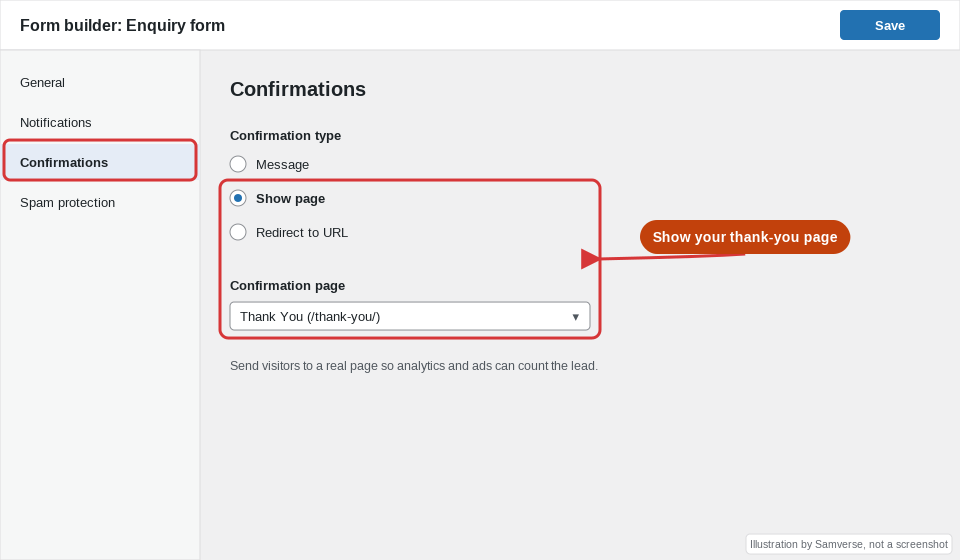
For Contact Form 7, this script, added to the page's footer or through a code snippets plugin, redirects only after the email has been sent successfully. Replace 123 with your form's ID, shown in its shortcode:
<script>
document.addEventListener( 'wpcf7mailsent', function( event ) {
  if ( '123' == event.detail.contactFormId ) {
    location = 'https://example.com/thank-you/';
  }
}, false );
</script>
Give each important form its own page, such as one for quote requests and one for brochure downloads, so your reports show which form produced each lead. WordPress form plugins compared helps if you're choosing a plugin.
Keep thank-you pages out of Google
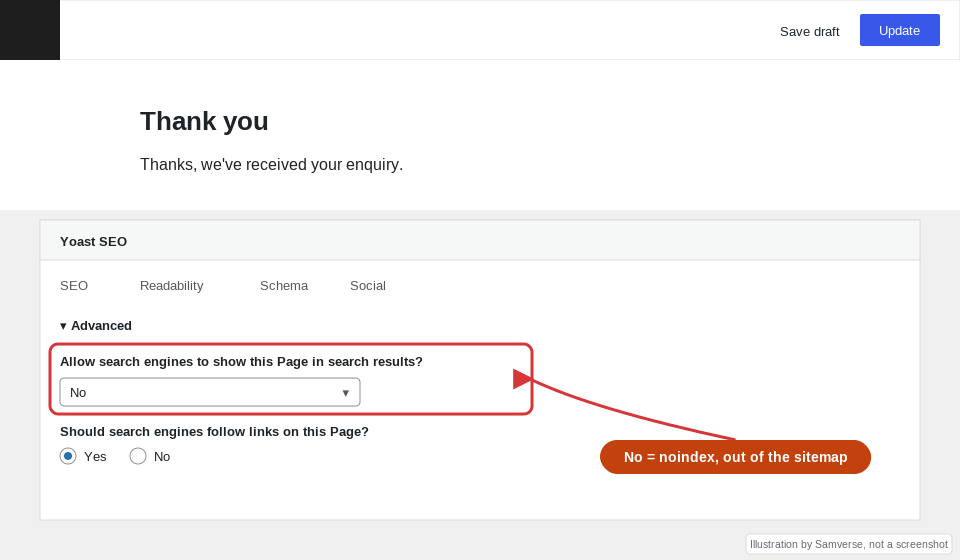
- Set the page to noindex. In Yoast, open the Advanced tab in the editor and answer No to showing the page in search results; in Rank Math, tick No Index under Advanced > Robots Meta. Both then leave it out of the sitemap.
- Don't block it in robots.txt. Google needs to crawl the page to see the noindex.
- Don't link to it from menus, footers or other pages.
- Gated downloads: a brochure link on a thank-you page can be shared, which is fine for most brochures. For anything you want to control, email the file instead.
Track it, and count each enquiry once
In GA4
- Go to Admin > Data display > Events and click Create event.
- Name it generate_lead, Google's recommended name for a lead, and set two conditions: event_name equals page_view, and page_location contains thank-you (or the slug of your page).
- Mark generate_lead as a key event under Admin > Data display > Key events.
- Set its counting method to once per session, available at the time of writing, so a refresh or a second visit to the page in the same session isn't counted twice.
If your form uses an inline message instead, fire the event from the form's success event, usually through Google Tag Manager; GA4 events explained covers the options.
In Google Ads and Meta
Use the same thank-you page or success event for your Google Ads conversion action and set it to count one conversion per click, which is Google's recommended setting for leads. Fire the Meta Pixel's Lead event on the same trigger. Use either the Google Ads tag or a GA4 import as the primary conversion for each action, not both. Google Ads conversion tracking on WordPress walks through the setup.
Test before you rely on it
Send a real test enquiry from your phone. Check that the thank-you page loads, the event appears in GA4's Realtime report or DebugView, the conversion shows in Google Ads' and Meta's testing tools, and the notification email reaches the right inbox. Then refresh the thank-you page and confirm nothing is counted twice.
Thank-you page wording by enquiry type
| Enquiry | What to say next | Faster route |
|---|---|---|
| Clinic appointment | When the clinic will call to confirm the slot | Call or WhatsApp the front desk |
| Service quote | What details you will ask for and when the quote arrives | Send photos on WhatsApp |
| B2B or bulk enquiry | Who will reply and what they need, such as quantities | Download the catalogue |
| Course or admission | When the counsellor calls and what to keep ready | Book a demo or visit |
Only promise a reply time you can keep every day.
When to get help
Get help when ad platforms and GA4 show different lead counts, when the form plugin cannot redirect the way you need, or when you are about to spend on ads without tested tracking. A landing page comes with its thank-you page and conversion tracking tested, and you can hire a WordPress developer to fix tracking on an existing site. send your website address for a free review and a fixed quote.
FAQs
Should a thank-you page be noindexed?
Yes. It is useless as a search result and visits from search would inflate your conversion counts. Set it to noindex in your SEO plugin, keep it crawlable and don't link to it from menus.
How do I set up a lead form thank you page redirect?
Create and noindex the thank-you page, then change the form's confirmation setting from a message to a redirect to that page. Submit a test lead and check that you land on the page, the enquiry email arrives and your analytics records one conversion.
How do I redirect Contact Form 7 to a thank-you page?
Contact Form 7 has no redirect setting. Add a short script that listens for its wpcf7mailsent event and sends the browser to your thank-you page, or use an add-on plugin that adds a redirect option to each form.
How do I track a thank-you page as a conversion in GA4?
Create a generate_lead event that fires when page_view happens on your thank-you page's URL, mark it as a key event and set it to count once per session. Then test it with a real submission in DebugView.
Is a thank-you page better than a confirmation message?
A page gives you more room for next steps and simpler tracking; an inline message suits pop-ups, multi-step forms and forms that continue into WhatsApp. Either works if it is obvious and tracking fires only after a successful submission.
How do I redirect to a thank-you page after form submit in WordPress?
Use your form plugin's confirmation setting: in WPForms choose "Go to URL (Redirect)", in Gravity Forms set the confirmation type to Page or Redirect, and in Contact Form 7 add a redirect on its successful-submission event. Test that failed submissions do not redirect.
Why is my thank-you page counting conversions twice?
Usually a refresh, the back button or two tags firing on the same page. Count the conversion once per session or submission, check that GA4 and Google Ads are not both importing the same action as primary, and test with Tag Assistant.
Need help with your website?
I'm a freelance WordPress developer building fast, SEO-friendly websites since 2020. Tell me what you need and I'll reply with a plan and a fixed quote, usually within 24 hours.
Freelance WordPress development, building websites for clinics, manufacturers, agencies and online stores since 2020.
More about me