Gutenberg vs Elementor: Which WordPress Editor Should You Use in 2026?
Gutenberg vs Elementor compared: editing, speed, design freedom, cost, lock-in and client editing, with a side-by-side build table and when to pick each.

On this page
- Gutenberg or Elementor? A 30-second decision
- Quick comparison
- Editing experience
- Performance
- Design flexibility
- Cost
- Lock-in and switching later
- Gutenberg vs Elementor for agencies and handovers
- Updates and maintenance
- Gutenberg vs Elementor: the same page built both ways
- When to choose each
- How to move a page from Elementor to Gutenberg
- When to get help
- FAQs
- Gutenberg vs Elementor: Gutenberg is built into WordPress, free, lighter by default and stores content natively; Elementor gives visual drag-and-drop design with popups, forms and theme building in Pro.
- Speed depends more on how a site is built than on the editor: a careful Elementor build can be fast, and a bloated block theme can be slow.
- Choose Elementor for design-heavy marketing pages edited by non-technical teams, Gutenberg for content sites and long-term flexibility, or use both on one site.
Gutenberg vs Elementor comes down to this: Gutenberg, WordPress's built-in block editor, is free, lighter and keeps your content native to WordPress, while Elementor, a drag-and-drop page builder plugin, gives non-technical teams more visual design control at the cost of extra code and a yearly Pro licence. Choose Gutenberg for blogs and lean business sites, and Elementor for design-heavy marketing pages your team wants to edit visually.
Short answer: Gutenberg vs Elementor: pick Gutenberg, the free built-in block editor, if your team mainly writes posts and edits text and you want a lighter site. Pick Elementor if your team wants to design landing pages visually without a developer. Many business sites use Gutenberg for posts and Elementor for a handful of marketing pages.
Gutenberg or Elementor? A 30-second decision
| If this describes you | Pick |
|---|---|
| Blog, news, resources or a lean brochure site | Gutenberg |
| Speed on mobile data is the top priority | Gutenberg |
| You don't want a yearly builder licence | Gutenberg |
| Marketing team builds new landing pages for ads and offers | Elementor |
| Design-heavy pages with popups, forms and motion | Elementor (Pro) |
| Agency handing a visual editor to a non-technical client | Elementor, with role limits |
| Long-term flexibility and minimal lock-in matter most | Gutenberg |
Quick comparison
| Elementor | Gutenberg (block editor) | |
|---|---|---|
| Editing | Visual drag-and-drop on a live canvas | Block-based, increasingly visual |
| Design flexibility | Very high out of the box | Good, and growing with block themes and patterns |
| Performance | Heavier, needs a careful build | Lighter by default |
| Cost | Free version; Pro is a paid yearly licence | Free, part of WordPress |
| Learning curve for owners | Very easy for visual changes | Easy for text, harder for layouts |
| Lock-in | Layouts tied to Elementor | Native WordPress content |
| Popups, forms, theme building | Built into Pro | Site Editor for templates; other features via plugins |
| Best for | Marketing sites and landing pages | Blogs, content sites, lean business sites |
Editing experience
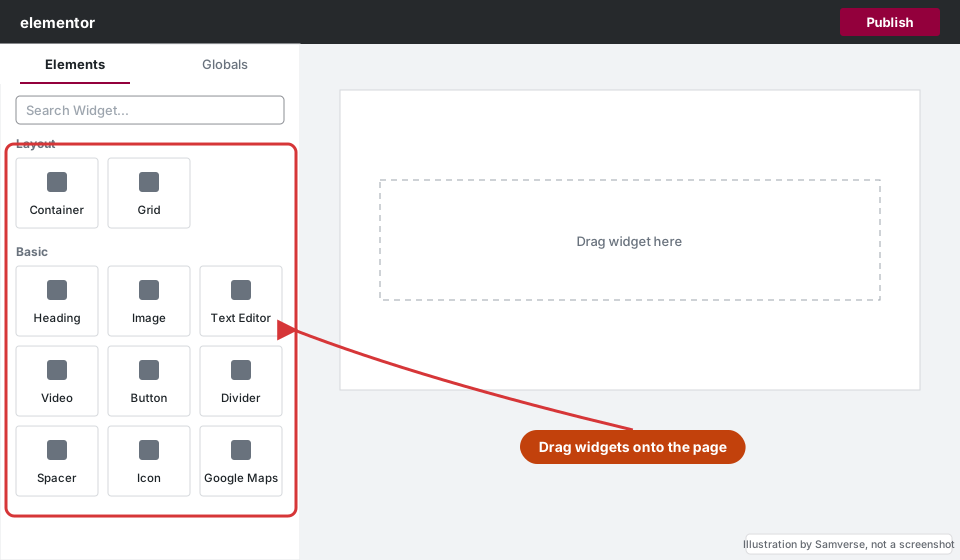
Elementor feels like a design tool. You see exactly what visitors will see, click any element to change it and preview each screen size. For non-technical teams that's reassuring. The downside is that every widget has dozens of settings, so pages built by different people can drift apart: slightly different spacing, fonts and button styles on every page.
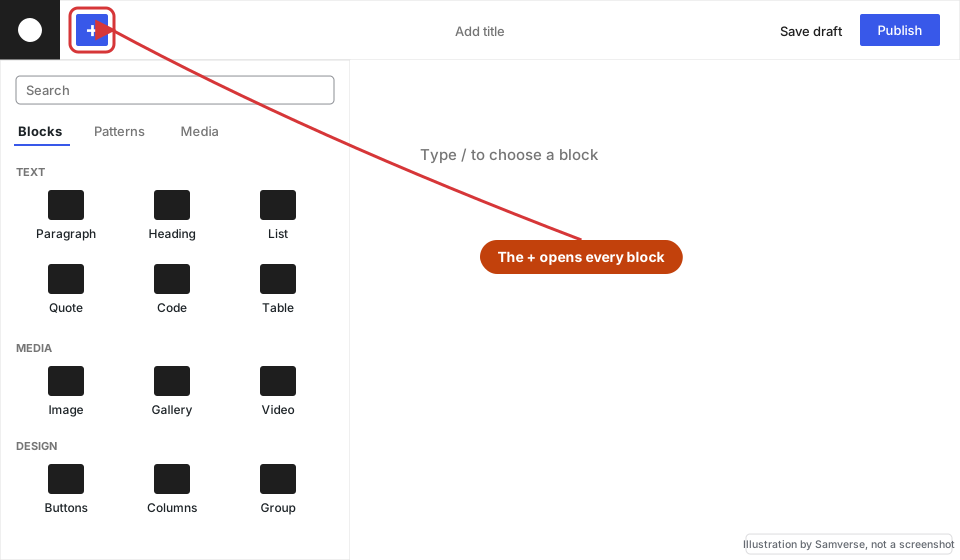
Gutenberg feels like a writing tool that has grown layout features. Writing and editing text is quick and clean, and reusable patterns make it easy to insert a ready-made section. Building complex layouts from scratch is harder for beginners, and the design options available depend heavily on the theme. The upside is consistency: styles come from the theme, so pages tend to look like they belong together.
Performance
Gutenberg sites are usually lighter out of the box. WordPress can load styles only for the blocks used on each page, and there's no extra editor framework running on the front end.
Elementor adds more code: its own stylesheets and scripts, extra wrapper elements in the HTML (reduced by its newer container layout), icon libraries, fonts and animations, and often add-on widget packs. But a well-built Elementor site on good hosting, with a lightweight theme, caching, optimised images and only the features it needs, can still be very fast. Most slow Elementor sites are slow because of how they were built, not because of Elementor itself.
If your Elementor site is already slow, see why Elementor sites get slow and how to fix them.
Gutenberg isn't automatically fast either: a heavy theme, large block libraries, sliders and unoptimised images will slow any site. Measure with real tests rather than assumptions; see Core Web Vitals explained.
Design flexibility
For design-heavy pages, Elementor gives more out of the box: motion effects, custom layouts per device, popups, forms, loops of posts or products, and theme templates, all without code. A designer's Figma file can usually be matched closely.
Gutenberg has caught up a lot. Group, row, stack and grid blocks handle most layouts, patterns give you reusable sections, and block themes control the whole site. Where something isn't possible with core blocks, a developer can build custom blocks that match your design exactly and give editors only the fields they need; see custom Gutenberg blocks. That takes more development time up front, but the result is lean and hard to break.
Your theme matters just as much as the builder, because it controls the base styles, fonts and how much extra code loads on every page.
Cost
Gutenberg is free and comes with WordPress. Elementor's free version is enough for simple pages, but most business sites end up using Pro for the theme builder, forms and popups. Pro is a yearly licence, priced by the number of sites, and renewing it is what keeps updates and support coming. Check Elementor's current terms for what happens to Pro features if a licence lapses, and budget for any add-on packs, which usually have their own licences.
The other cost is development time. An Elementor site is often quicker to build; a custom block setup costs more up front but may need less fixing later.
Going with Elementor? See is Elementor Pro worth it?
Lock-in and switching later
Elementor stores layouts in its own format. If you deactivate it, the text on your pages usually remains as plain, unstyled content, but the layout and design are gone, and pages built with it have to be rebuilt in whatever you move to. That's manageable for a ten-page site and a real project for a large one.
Gutenberg content is native WordPress content and survives a theme change far better, and block themes extend it to headers and footers. Third-party block plugins create a smaller version of the same problem: remove the plugin and its blocks stop displaying properly.
Gutenberg vs Elementor for agencies and handovers
If you are an agency or freelancer building for clients, think about the person who inherits the site. A visual editor means fewer support calls but more broken mobile layouts; a locked block setup means less breakage but more requests for new sections. Whichever you choose, document which templates, global styles and patterns exist, and give the client a short screen recording of the edits they are likely to make.
Updates and maintenance
Gutenberg improves with each WordPress release, so there's one less plugin to update. Elementor releases updates often, and major ones occasionally change how layouts render, so test on a staging copy before updating a live site; see fixing an Elementor layout broken after an update.
One common Elementor support job is a header or footer that disappears after a change; how to fix an Elementor header or footer not showing explains the usual causes.
Gutenberg vs Elementor: the same page built both ways
A comparison of features only goes so far. This is how common jobs on a typical Indian small business site, such as a clinic, a coaching institute or a manufacturer, play out in each editor:
| Job | In Elementor | In Gutenberg |
|---|---|---|
| Hero section with heading, text, button and image | Container plus widgets, styled per device in the panel | Cover or group block, or a ready-made pattern from the theme |
| Enquiry form that sends email and WhatsApp alerts | Elementor Pro form widget, or a form plugin | A form plugin block |
| Header and footer on every page | Pro theme builder templates | Template parts in the Site Editor (block theme) |
| Festival offer popup | Pro popup builder with display rules | A popup plugin |
| Services grid pulling from a custom post type | Pro loop grid | Query loop block |
| Hindi and English versions of a page | Works with multilingual plugins; layouts duplicated per language | Works with multilingual plugins; blocks translated natively |
| Owner changes a price or phone number | Click the text on the canvas and type | Click the block and type; a locked pattern prevents layout mistakes |
Before you choose, answer these questions honestly:
- Who will edit the site after launch, and how often?
- Will you build new landing pages yourself for ads and offers?
- Is the site mostly articles, or mostly designed sales pages?
- Are you happy to renew a builder licence every year?
- Does most of your traffic come on mobile data, where every extra script counts?
Two or more answers pointing to frequent visual editing by non-developers usually means Elementor; mostly content and a tight speed budget usually means Gutenberg.
When to choose each
Choose Elementor if...
- You want to edit layouts visually without touching code
- You need custom, design-heavy pages, landing pages and popups
- Your team isn't technical and wants to make changes confidently
- You want forms, popups and theme templates in one tool (Elementor Pro)
Pair it with a lightweight theme; see the best theme for Elementor.
Choose Gutenberg if...
- Speed and a lightweight site are top priorities
- Your site is content-focused: blogs, news, documentation, resources
- You want to avoid yearly builder licence costs
- You want content that isn't tied to a third-party builder
Your theme matters just as much as the builder; see how to choose a WordPress theme.
How to move a page from Elementor to Gutenberg
Switching does not have to happen all at once. Move pages one at a time:
- Back up the site and work on a staging copy.
- Screenshot the Elementor page at desktop and mobile widths, so you have a reference.
- Create a new draft page in Pages > Add New, which opens in the block editor.
- Rebuild each section with core blocks: Cover, Columns, Group, Image and Buttons. Save sections you repeat, such as a call to action, as synced patterns.
- Paste text in as plain text, so Elementor's markup does not come across with it.
- Check the mobile view, then swap the slugs so the new page keeps the old URL and no redirect is needed.
- Deactivate Elementor only when no page, header, footer or popup still uses it. Anything left behind shows as broken layout or raw shortcodes (see shortcodes vs blocks).
When to get help
Get help when you're moving an existing site from one editor to the other, because pages don't convert automatically and each one is rebuilt; when an Elementor site has slowed down under several add-on packs; or when a handover is coming and the client needs to edit without breaking layouts.
Not sure which suits your site, or need an existing build made faster? I build and fix both Elementor and block editor sites, including pixel-matched designs from Figma: see Elementor development, or Figma to WordPress if you have a design ready.
FAQs
Gutenberg vs Elementor: which is better?
Neither is better for every site, so the real question is Gutenberg or Elementor for your team. Gutenberg is better for blogs, content sites and lean business sites; Elementor is better when a non-technical team wants to design and edit marketing pages visually. Gutenberg is not replacing Elementor, and many sites use both.
Is Gutenberg faster than Elementor?
Usually, out of the box, because it loads less code. A carefully built Elementor site can still pass Core Web Vitals, and a heavy block theme can be slow, so test the finished site rather than the editor.
Is Elementor bad for SEO?
Not in itself. Google ranks content, relevance and page experience, not the editor. Elementor sites can rank well if they're fast, use proper headings and have good content.
Can I switch from Elementor to Gutenberg?
Yes, but there's no clean automatic conversion. Pages are usually rebuilt in blocks, which is a good moment to simplify the design and improve speed.
Does Elementor work with Gutenberg on the same site?
Yes. Elementor and Gutenberg can run side by side: you choose per page or post, so blog posts can use the block editor while the homepage and landing pages use Elementor. Keep one theme and shared colours and fonts so both kinds of page look consistent.
Is Elementor built on Gutenberg?
No. Elementor is a separate plugin that replaces the editor on pages you open with "Edit with Elementor". It stores the layout in its own data, so those pages cannot be edited as normal blocks, and switching later means rebuilding them.
Gutenberg or Elementor: which is easier for beginners?
For writing and updating posts, Gutenberg is easier because there is less to learn. For designing a page from scratch, most beginners find Elementor's drag-and-drop panel more intuitive. A site built with good block patterns narrows the gap a lot.
Need help with your website?
I'm a freelance WordPress developer building fast, SEO-friendly websites since 2020. Tell me what you need and I'll reply with a plan and a fixed quote, usually within 24 hours.
Freelance WordPress development, building websites for clinics, manufacturers, agencies and online stores since 2020.
More about me